> ## Documentation Index
> Fetch the complete documentation index at: https://checkly-422f444a-mintlify-5577f365.mintlify.site/llms.txt
> Use this file to discover all available pages before exploring further.
# Custom domain
> Add a custom domain to your status page.
You can host your status page on your own domain. To set it up, add the domain in Checkly and create the required DNS records with your DNS provider.
Custom domains are available on Communicate Starter, Team and Enterprise
plans. [View pricing](https://checklyhq.com/pricing)
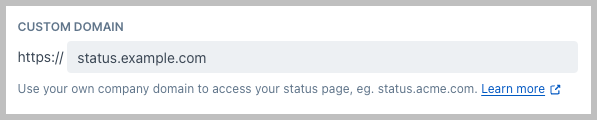 Create a CNAME record with your DNS provider and point it to
`custom-domain.checkly-status-page.com` For example, in Cloudflare, the
configuration looks like this:
Create a CNAME record with your DNS provider and point it to
`custom-domain.checkly-status-page.com` For example, in Cloudflare, the
configuration looks like this:  If your provider is Cloudflare, you must disable the proxy on the CNAME, it
should always be set to DNS only.
After you've added your custom domain and saved the page, one or more TXT records will be displayed depending on the domain you're using.
If your provider is Cloudflare, you must disable the proxy on the CNAME, it
should always be set to DNS only.
After you've added your custom domain and saved the page, one or more TXT records will be displayed depending on the domain you're using.
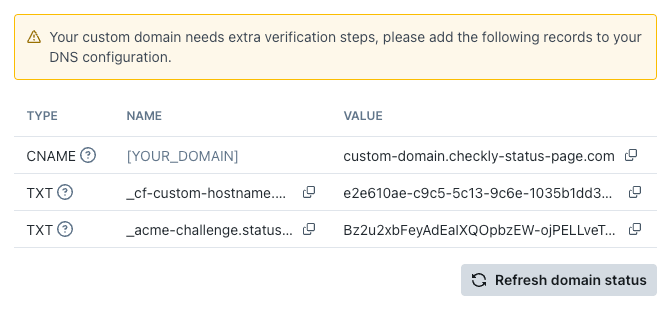 Update your DNS settings to match the TXT record(s) displayed on your Status Page to prove the ownership of the domain.
Search engines require this verification to index and list your Status Page.
Update your DNS settings to match the TXT record(s) displayed on your Status Page to prove the ownership of the domain.
Search engines require this verification to index and list your Status Page.